
Hi, I’m Jojo. I design and build most of what you click on around here, and I’m going to start writing these little updates so you always know what changed and why.
This one is about the co-author training. Cozy Co-Author and Steamy Co-Author now live inside the Co-Author Method: one shared core, with each genre woven through it. When you open a lesson, you’ll find three things that weren’t there before.
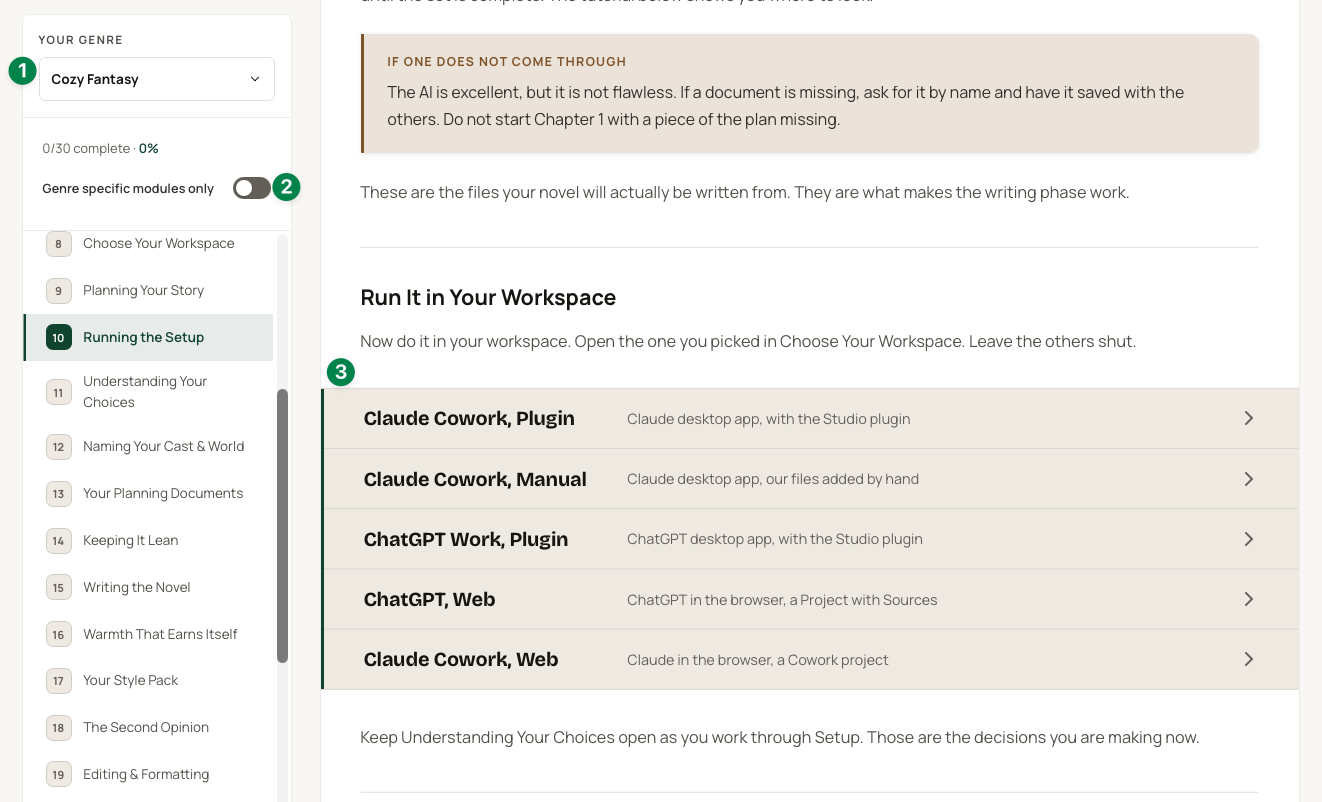
Here’s what each one does.
Your Genre
At the top of the lesson sidebar there’s now a Your Genre menu. Pick Cozy Fantasy or Dark Romance and the course changes to match.
- Your 5 genre lessons show up in the sidebar.
- Genre passages appear inside the shared lessons, like the cover prompts, the description and keyword advice, and the series advice.
- Your genre’s downloads and checklists show up alongside the lesson.
Genres you own are marked Owned. You can still pick one you don’t own to have a look. You’ll just see locked boxes where the genre content would be.
Genre specific modules only
Under your progress bar there’s a switch called Genre specific modules only. Turn it on and the sidebar shrinks to your genre lessons plus the shared lessons that change the most for your genre.
So if you already know the method from Cozy and you pick up Dark Romance, or History when it arrives, you don’t have to wade through 30 lessons you already know. You go straight to what’s different.
Choose your workspace
There are a few ways to write your book with us now. You can use the Claude or ChatGPT desktop app, or stay in the browser. You can use our Studio plugin, which has all our files and prompts built in, or add the files yourself.
That used to mean long lessons full of instructions for setups you’d never use. Now Running the Setup and Writing the Novel each have a workspace list with five options.
- Claude Cowork, Plugin. The Claude desktop app, with the Studio plugin.
- Claude Cowork, Manual. The Claude desktop app, with our files added by hand.
- ChatGPT Work, Plugin. The ChatGPT desktop app, with the Studio plugin.
- ChatGPT, Web. ChatGPT in the browser, in a Project with Sources. This is how the earlier courses worked.
- Claude Cowork, Web. Claude in the browser, made for tablets, Chromebooks and anything that can’t run the desktop app.
Pick yours and the other four fold away. Only your click-by-click steps stay open. Your browser remembers the choice, so both lessons open to the same setup.
Not sure which one to pick? Our new Choose Your Workspace module explains all five.
If you’re curious about the plugin, it’s the easiest way in. You say “Let’s plan my cozy fantasy novel,” it interviews you, and it saves your planning documents as real files on your computer. Then you write one chapter per conversation, and it keeps a running memory of the book so chapter 20 stays as sharp as chapter 1.
Filter the discussion by genre
One more, at the bottom of every lesson. Now that everyone shares the same lessons, the Discussion box has a genre filter in the top right corner.
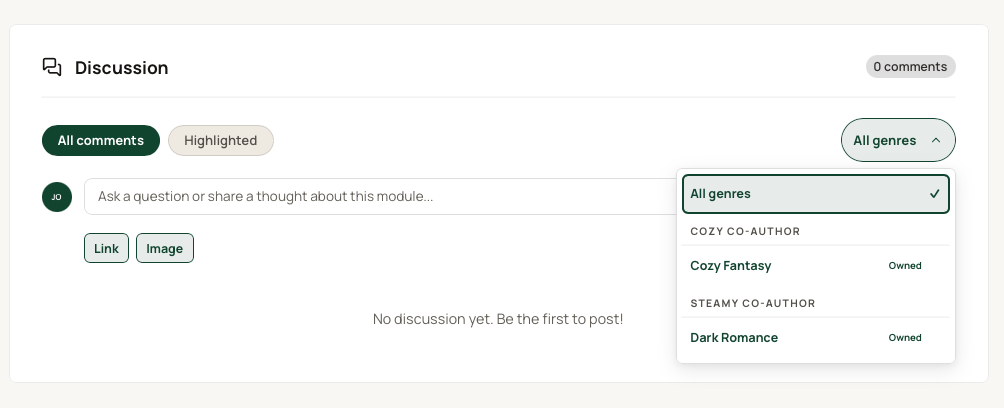
It starts on All genres, so you see what everyone is saying. Pick Cozy Fantasy or Dark Romance to see only the comments from writers in that genre. When you post, your comment is tagged with the genre you picked in the sidebar, so other writers know where you’re coming from.
Why we wove them together
I’ll be honest with you. This one was mostly for us, and it turned into something that’s much better for you.
We had Cozy Co-Author and Steamy Co-Author. Two courses, 62 modules, and most of the lessons were the same lesson in a different outfit. Every time something changed, like a new app or a better prompt, we had to fix it in two places. With History Co-Author coming next, that would have been three nearly identical courses to keep up to date.
It was exhausting, and it meant updates took longer to reach you.
So Soren rewrote the core once and wove the genres into it. Everyone gets the same 25 core lessons, with genre passages running through them, plus 5 lessons written just for their genre. If you’ve been through the old course, you’ll notice it reads differently. That’s on purpose.
What comes with you
- Your progress. Completed lessons, points, badges and streaks all carry over. A few Cozy checklist ticks won’t, because those steps aren’t in the new version.
- Your links. Old lesson links take you to the matching new lesson.
- Your conversations. Discussion posts, bookmarks and ratings move to the matching new lessons too.
Your Cozy or Steamy card on the dashboard now opens the Co-Author Method with your genre already picked.
That’s the update
Thank you for writing with us. All of this came from watching how you actually use the courses, so if something feels clunky or you have an idea, reply to any of our emails. We read every one.
More next month.